What Information Is Needed to Build a Wireless Infrastructure for an Outdoor Camera Project?
To build a reliable wireless infrastructure for outdoor camera projects, key details such as camera locations, distances, line of sight, power availability, PoE requirements, antenna type, frequency band, network topology, recording center, and environmental conditions must be analyzed correctly. In this guide, we explain the essential data needed for planning outdoor IP camera wireless connections.
 wifiAnten Ekibi
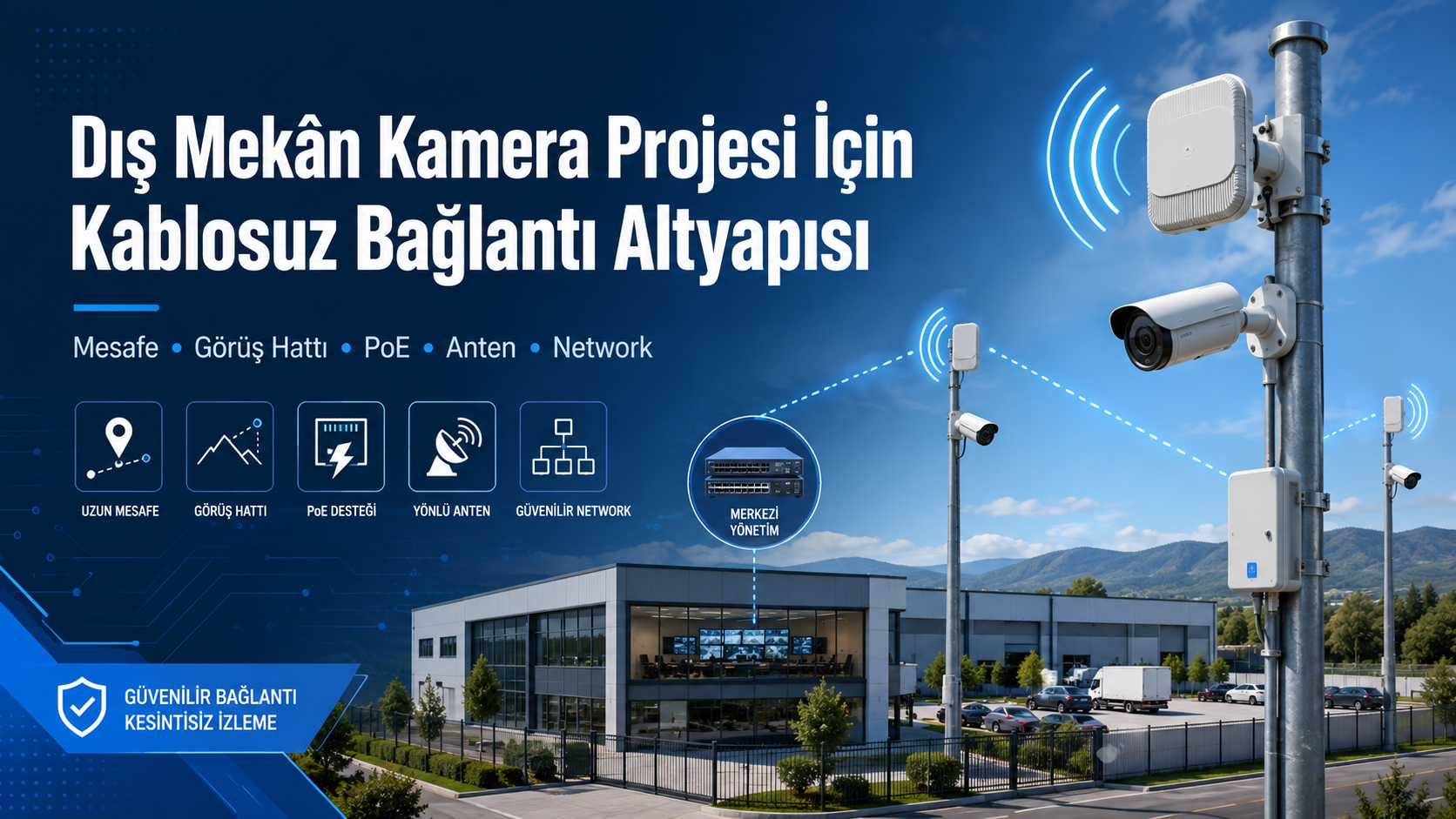
What Information Is Needed to Build a Wireless Infrastructure for an Outdoor Camera Project?
Summary
To build a reliable wireless infrastructure for outdoor camera projects, key details such as camera locations, distances, line of sight, power availability, PoE requirements, antenna type, frequency band, network topology, recording center, and environmental conditions must be analyzed correctly.
In this guide, we explain the essential data needed for planning outdoor IP camera wireless connections.
What Information Is Needed to Build a Wireless Infrastructure for an Outdoor Camera Project?
Outdoor camera systems are widely used in factories, parking lots, farms, construction sites, warehouses, residential areas, campuses, gardens, and large open spaces to improve security. However, in outdoor environments, running cables to every camera point may not always be possible.
In such cases, a wireless connection infrastructure provides an effective way to transmit camera footage to the recording center or monitoring point. However, creating a successful wireless camera project requires more than simply choosing cameras and antennas. Site conditions, distance, line of sight, power infrastructure, bandwidth requirements, PoE needs, and network planning must all be evaluated together.
1. Camera Locations Must Be Clearly Defined
The first step in a wireless camera project is identifying where the cameras will be installed. Each camera location should be clearly defined.
Information to collect:
- Where will the camera be installed?
- Will it be mounted on a pole, wall, roof, or tower?
- Will it be a fixed camera or a PTZ camera?
- Which area will the camera monitor?
- Is there a direct line of sight between the camera point and the recording center?
- Is power available at the camera location?
- Will there be more than one camera at the same point?
Without clearly identifying camera locations, it is not possible to design an accurate wireless connection plan.
2. The Recording Center or Monitoring Point Must Be Defined
Where the camera footage will be transmitted should be determined at the beginning of the project. This point is usually where the NVR, recording server, or security room is located.
Key points to determine:
- Where will the NVR or recording server be located?
- Is the internet connection available at the recording center?
- Will all cameras connect to this center?
- Will there be multiple monitoring points?
- Where will security staff watch live footage?
- Will the camera network run on the existing network or a separate network?
Wireless infrastructure is usually planned from the camera points toward the recording center.
3. Distance Information Must Be Measured
Distance is one of the most critical data points in outdoor wireless connection projects. The distance between the camera point and the center directly affects antenna type and device capacity.
Distances to measure:
- Distance between camera point and recording center
- Distance between poles
- Distance between intermediate connection points
- Cable distance between camera and PoE switch
- Distance between wireless bridge device and camera
As the distance increases, higher-gain antennas, more accurate alignment, and more powerful wireless devices may be required.
4. Line of Sight Must Be Analyzed
One of the most important factors in wireless camera connections is line of sight. In point-to-point links, the two wireless devices should be able to see each other as clearly as possible.
Obstacles to check:
- Buildings
- Trees
- Hills
- Walls
- Metal structures
- Cranes or machinery
- Vehicle traffic
- Utility poles
- High-voltage lines
If there are obstacles in the line of sight, connection quality may decrease, video freezing may occur, or the link may disconnect completely. Therefore, the mounting height of the devices should also be determined during the site survey.
5. Connection Topology Should Be Planned
In outdoor camera projects, wireless connections can be designed with different topologies. The correct structure depends on the number of cameras, distance, and site conditions.
Common connection topologies include:
Point-to-Point Connection
A camera point or remote location connects wirelessly to a central point. It is suitable for transmitting camera footage between two buildings.
Point-to-Multipoint Connection
A central access point or sector antenna collects multiple remote camera points wirelessly. It can be preferred for large sites, farms, factories, and parking lots.
Mesh Connection
Devices communicate with each other wirelessly. This can be used in specific scenarios, but in camera systems it must be planned carefully due to bandwidth and stability requirements.
Repeater or Intermediate Point Connection
If there is no direct line of sight, an intermediate point can be used to relay the signal.
Choosing the right topology is important for stable system operation.
6. Camera Count and Bandwidth Must Be Calculated
When planning wireless infrastructure, the number of cameras and the data traffic generated by each camera must be calculated. Since IP cameras transmit video continuously, the wireless connection must have enough capacity.
Information to consider:
- Number of cameras
- Camera resolution
- FPS value
- Video compression format
- Continuous recording or motion-based recording
- Main stream and sub stream values
- PTZ camera usage
- AI analytics features
For example, 4 MP and 8 MP cameras use more bandwidth than 2 MP cameras. As the number of cameras increases, the wireless bridge capacity should be selected accordingly.
7. Frequency Band Should Be Selected
For outdoor wireless camera links, the 5 GHz band is commonly preferred. In some special cases, 2.4 GHz, 6 GHz, or licensed frequency solutions may also be considered.
2.4 GHz
Can provide wider coverage but has a higher risk of interference.
5 GHz
Commonly preferred for outdoor bridge projects because it offers higher speed and more stable connections.
6 GHz
With compatible devices, it can offer lower congestion and higher capacity.
When selecting the frequency band, surrounding wireless interference, distance, legal usage conditions, and device support should be considered.
8. Antenna Type Must Be Determined
Antenna selection directly affects the success of wireless camera infrastructure. The antenna type should be selected according to connection distance and topology.
Common antenna types:
- Directional antenna
- Panel antenna
- Dish antenna
- Sector antenna
- Omni antenna
- Outdoor access point with integrated antenna
- Wireless bridge device
Directional antennas provide a strong and focused connection between two points.
Sector antennas are used to cover multiple remote points from a central location.
Omni antennas provide 360-degree coverage but may not always be ideal for high-capacity camera projects.
9. Outdoor Durability of Devices Must Be Checked
Wireless devices used outdoors must be resistant to weather conditions. Standard indoor products may fail quickly when used outdoors.
Important features to check:
- IP protection rating
- Operating temperature
- UV resistance
- Moisture and dust resistance
- Wind resistance
- Mounting accessory compatibility
- Grounding support
- Lightning protection requirements
For outdoor devices, quality installation and correct positioning have a major impact on product lifetime.
10. Power Infrastructure and PoE Requirements Must Be Determined
One of the most important issues at outdoor camera points is power availability. The power requirement for the camera, wireless device, and PoE switch, if used, should be calculated in advance.
Questions to ask:
- Is electricity available at the camera point?
- Will the camera be powered by PoE?
- Will the wireless device operate with PoE?
- How many devices will be powered at the same point?
- Is a PoE switch required?
- Will UPS or solar power be used?
- What is the total power consumption?
With PoE, cameras and wireless devices can receive power through a single Ethernet cable. However, the PoE standard and power budget must always be checked.
11. Cable Distances and Cable Type Should Be Planned
Even if wireless connection is used, Ethernet cables are still required between cameras, PoE switches, and wireless bridge devices. Therefore, cable distances must be calculated.
Important points:
- Distance between camera and PoE switch
- Distance between wireless device and switch
- Outdoor Cat6 cable requirement
- Cable conduit or route planning
- 100-meter Ethernet limit
- Fiber requirement
- Grounding and lightning protection
For outdoor installations, UV-resistant, high-quality, and standards-compliant cable should be used.
12. Pole, Tower, and Mounting Height Should Be Determined
Correct mounting height is very important for wireless connection performance. Poles or towers may be required, especially to achieve proper line of sight.
Information to collect:
- Is there an existing pole?
- Will a new pole be installed?
- What should the pole height be?
- Will the camera and antenna be on the same pole?
- Has wind load been considered?
- Are suitable mounting brackets available?
- Can the devices be aligned properly?
Incorrect height or weak mounting can negatively affect connection quality and device safety.
13. Network Structure and IP Plan Should Be Created
A camera project is not only about physical connectivity. IP addressing and network security must also be planned correctly.
Key points to define:
- Which IP range will the cameras use?
- Which IP addresses will wireless devices use?
- Will the camera network run on a separate VLAN?
- Which network will the NVR be connected to?
- Will a router or firewall be used?
- How will remote access be provided?
- Will user authorization be applied?
Running the camera network on a separate VLAN provides advantages in both security and performance.
14. Remote Monitoring and Internet Connection Should Be Evaluated
In outdoor camera projects, users often want to monitor live footage from a phone or computer. For this, internet infrastructure and upload speed are important.
Information to evaluate:
- Where is the internet connection located?
- Is upload speed sufficient?
- How many users will monitor remotely?
- Is a static IP required?
- Will VPN be used?
- Will mobile app access be provided?
- Will cloud recording or local recording be preferred?
Security measures should be taken for remote access, and unnecessary port forwarding should be avoided.
15. Redundancy and Security Measures Should Be Planned
Continuous operation is important in outdoor camera systems. Therefore, redundancy should be considered for power, network, and recording.
Possible measures:
- UPS usage
- Backup internet connection
- Backup recording disk
- Separate VLAN for camera network
- Grounding
- Surge and lightning protection
- Locked outdoor cabinet
- Regular maintenance plan
- Device firmware updates
These precautions are especially important in factories, construction sites, farms, and high-security areas.
16. Brand and Product Selection Should Be Based on the Project
Brands such as UBNT and MikroTik are frequently preferred in outdoor wireless camera projects. However, the right brand and model should be selected according to the project requirements.
UBNT / Ubiquiti products stand out with centralized management, visual interface, outdoor wireless bridge solutions, and the UniFi ecosystem.
MikroTik products may be preferred for advanced routing, VLAN, firewall, bandwidth management, wireless bridge solutions, and strong price-performance advantages.
When choosing products, not only device price but also distance, capacity, ease of management, installation conditions, and technical support requirements should be considered.
Conclusion
To build a wireless infrastructure for outdoor camera projects, camera locations, recording center, distance, line of sight, antenna type, frequency band, PoE requirements, power availability, network plan, mounting height, and environmental conditions must be analyzed in detail.
A poorly planned wireless infrastructure can cause video freezing, disconnections, recording loss, and poor image quality. With proper site survey and correct product selection, a secure, stable, and high-performance camera system can be installed in large outdoor areas.
Therefore, before starting an outdoor camera project, a professional site survey should be performed, wireless link capacity should be calculated, and all infrastructure requirements should be clearly defined.
Visit the store to browse and purchase wifiAnten products.
Enter storeQuestions
No questions yet. Be the first to ask.
Written by
wifiAnten Ekibi
wifiAnten içerik ekibi.
Table of Contents
Related Posts
What Should You Consider When Choosing Wireless Products? A Guide for UBNT and MikroTik Solutions
When choosing wireless networking products, it is important to consider coverage area, number of users, frequency band, connection distance, indoor or outdoor usage, and management requirements. In this guide, we explain what to look for when selecting the right UBNT and MikroTik wireless products for your project.
Why Does the Windows "Passpoint" Label Appear on MikroTik Wi-Fi Networks and How to Fix It?
You have recently deployed a new MikroTik Access Point or updated your existing RouterOS system to v7. Everything seems to be working flawlessly, but when you try to connect to the network using a Windows 10 or Windows 11 device, you notice a mysterious **"Passpoint"** label appearing right next to or beneath your Wi-Fi name (SSID). Why is this phrase showing up when you haven't explicitly configured it anywhere? Does it pose a security risk? Most importantly, how do you get rid of it? In this post, we will dive into the root cause of this issue and walk through the exact steps to resolve it on MikroTik RouterOS.

UniFi AP Wireless Connection Problems and Troubleshooting Guide
Learn how to identify and troubleshoot common wireless connection problems in networks using UBNT UniFi Access Points. This guide covers signal quality issues, packet loss, incorrect IP configuration, DHCP problems, network loops, DTIM settings, AP placement, transmit power optimization, packet capture analysis, and hardware checks to help improve UniFi wireless network stability and performance.